XY Chart
Free Online Bar and Line Chart Maker
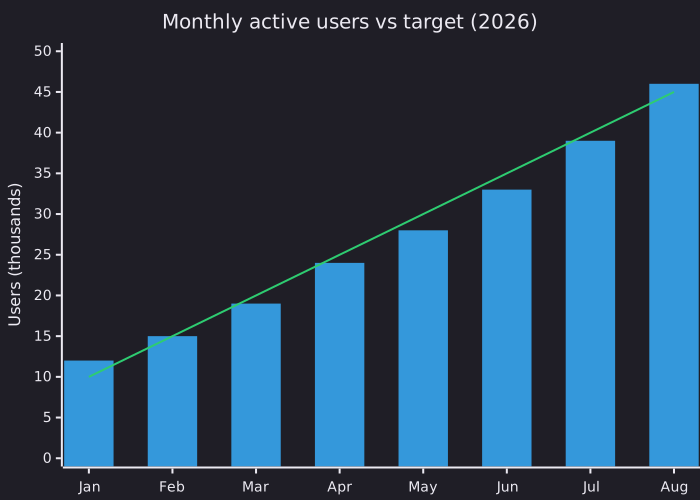
An XY chart plots numeric values against categories on two axes, drawn as bars, a line, or both. In Mermaid it covers the everyday bar chart and line chart: monthly revenue, usage over time, or actual figures against a target.
List the categories once, then each series as a bracketed list of numbers. Bars, lines or both, drawn on the same axes.
Last updated: · Mermaid v11
Try it live
When to use xy chart
Metrics in docs and READMEs
Put a bar chart of downloads, usage or response times next to the text that explains it, and update it by editing a list of numbers.
Actuals against a target
Draw the real figures as bars and the plan as a line on the same axes, so the gap in each period is visible without a spreadsheet.
Quick comparisons in reviews
Compare a handful of categories, such as regions, plans or releases, in a chart small enough to paste into a pull request or a report.
Key syntax
A newer Mermaid diagram type. Mermaid 11.10 and later also accept plain xychart, but xychart-beta works in every Mermaid version that has this diagram, including the older ones some sites and apps still run.
xychart-betaDeclare the chart (add horizontal for sideways bars)title "Text"Optional titlex-axis [a, b, c]Categories along the x-axisy-axis "Label" 0 --> 100Y-axis label and rangebar [1, 2, 3]A bar series, one value per categoryline [1, 2, 3]A line series on the same axesHow to create a xy chart with Mermaid
Open the FlowViz editor and type xychart-beta on the first line.
Add a title: title "My Chart".
List the categories: x-axis [Jan, Feb, Mar].
Set the y-axis label and range: y-axis "Revenue" 0 --> 100.
Add a series with bar [...] or line [...], one value per category.
Export as SVG or PNG, or copy a share link.
Frequently asked questions
Can I combine bars and a line?
Yes. Add both a bar [...] and a line [...] series and they share the same axes, which is handy for plotting actuals against a target.
How do the values line up with the x-axis?
By position: the first value in each series belongs to the first category in x-axis [...], the second to the second, and so on. Keep the lists the same length.
Can I make a horizontal bar chart?
Yes. Write xychart-beta horizontal on the first line and the bars run left to right.
Is the FlowViz chart maker free?
Yes. It is free with no account, and charts stay in your browser until you export SVG or PNG or share a link.
Start diagramming now
No signup. No install. Just open the editor and start writing.