Quadrant Chart
Free Online Quadrant Chart Maker
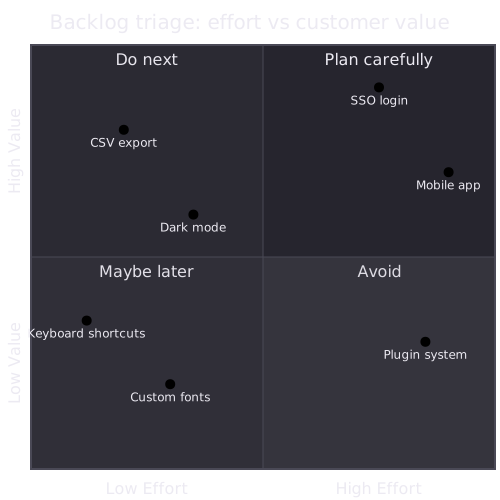
A quadrant chart is a scatter plot split into four quadrants by two axes, so each item lands in one of four groups. It is the usual way to draw a 2x2 matrix, such as effort against impact or urgency against importance, and decide what to do first.
Name the two axes and the four quadrants, then list each item with an x and y between 0 and 1. The chart places every point for you.
Last updated: · Mermaid v11
Try it live
When to use quadrant chart
Backlog prioritization
Plot features by effort and value to find the quick wins and the expensive long shots. Moving an item after a sizing discussion is a one-number edit.
Eisenhower matrix
Sort tasks by urgency and importance into do, schedule, delegate and drop. Written as text, the matrix fits in a planning doc or a weekly note.
Vendor or option comparison
Place candidates on two criteria, such as cost and fit, so a shortlist is visible at a glance and the reasoning behind it is in the source.
Key syntax
quadrantChartDeclare the charttitle TextOptional titlex-axis Low --> HighLeft and right labels of the x-axisy-axis Low --> HighBottom and top labels of the y-axisquadrant-1 NameTop-right quadrant (2 top-left, 3 bottom-left, 4 bottom-right)Item: [0.3, 0.7]A point, x and y between 0 and 1How to create a quadrant chart with Mermaid
Open the FlowViz editor and type quadrantChart on the first line.
Add a title: title My Chart.
Label the axes: x-axis Low Effort --> High Effort and y-axis Low Value --> High Value.
Name the quadrants with quadrant-1 (top-right) through quadrant-4 (bottom-right).
Add one point per line: Item name: [x, y], with x and y between 0 and 1.
Export the chart as SVG or PNG, or copy a share link.
Frequently asked questions
What is a quadrant chart used for?
Sorting a list of items into four groups along two dimensions, such as effort against value or urgency against importance. It turns a long backlog or a set of options into four piles you can act on.
How do the coordinates work?
Each point is Name: [x, y] with both values between 0 and 1. [0, 0] is the bottom-left corner and [1, 1] the top-right, so a point at [0.2, 0.8] sits in the top-left quadrant.
Which quadrant is quadrant-1?
quadrant-1 is top-right, then the numbering runs anticlockwise: quadrant-2 top-left, quadrant-3 bottom-left, quadrant-4 bottom-right.
Is the FlowViz quadrant chart maker free?
Yes. It is free with no account, diagrams stay in your browser, and you can export SVG or PNG or share the chart as a link.
Start diagramming now
No signup. No install. Just open the editor and start writing.