Git Graph
Free Online Git Graph Visualizer
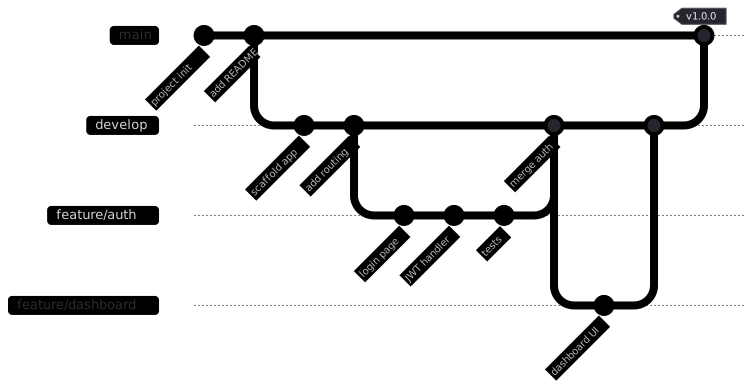
A git graph is a diagram that visualizes the commit history of a repository: it shows commits as points along branches, with lines marking where branches split off and where they merge back together, forming a picture of an actual git workflow.
Visualize git branches, commits, and merges with Mermaid. Perfect for documentation, README files, and team onboarding.
Last updated: · Mermaid v11
Try it live
When to use git graph
README documentation
Show your branching strategy visually in the README so contributors see it before their first PR. The git graph renders natively on GitHub and GitLab, so the diagram lives where the branches do.
Team onboarding
Explain Gitflow, trunk-based development, or your own convention with a graph of real commits, branches, and merges. One diagram replaces a page of prose about where feature branches come from and where they go.
Release planning
Visualize upcoming merges, release branches, and hotfix flows before you cut them. Walking the team through a git graph of the plan surfaces conflicts while they are still hypothetical.
Key syntax
gitGraphDeclare diagram typecommit id: "label"Add a commit with a labelbranch nameCreate a new branchcheckout nameSwitch to a branchmerge nameMerge a branch into currenttag: "v1.0"Add a tag to a committype: HIGHLIGHTHighlight a commit visuallyHow to create a git graph with Mermaid
Open FlowViz and type gitGraph.
Add commits to the main branch: commit id: "initial commit".
Create a feature branch: branch feature/my-feature.
Switch to it: checkout feature/my-feature.
Add commits on the feature branch.
Switch back: checkout main.
Merge the branch: merge feature/my-feature.
Add version tags with tag: "v1.0.0" on a commit.
Frequently asked questions
Can I generate a git graph from a real repository?
Not automatically — a Mermaid git graph is written by hand, so it shows the history you choose to tell rather than every commit that happened. For documentation that is usually the point: a README diagram of your branching model stays readable for years, while a faithful dump of real history is unreadable within a week. Write the shape of the workflow, not the log.
What is a git graph used for?
Visualizing branching strategies — commits, branches, merges, and tags — for documentation, onboarding, and team conventions.
How do I create branches and merges?
branch name creates and switches to a branch, checkout switches between branches, and merge name merges one in; add tag: "v1.0" to label a merge.
Can I label individual commits?
Yes — commit id: "message" names each commit in the graph.
Start diagramming now
No signup. No install. Just open the editor and start writing.