Radar Chart
Free Online Radar Chart Maker
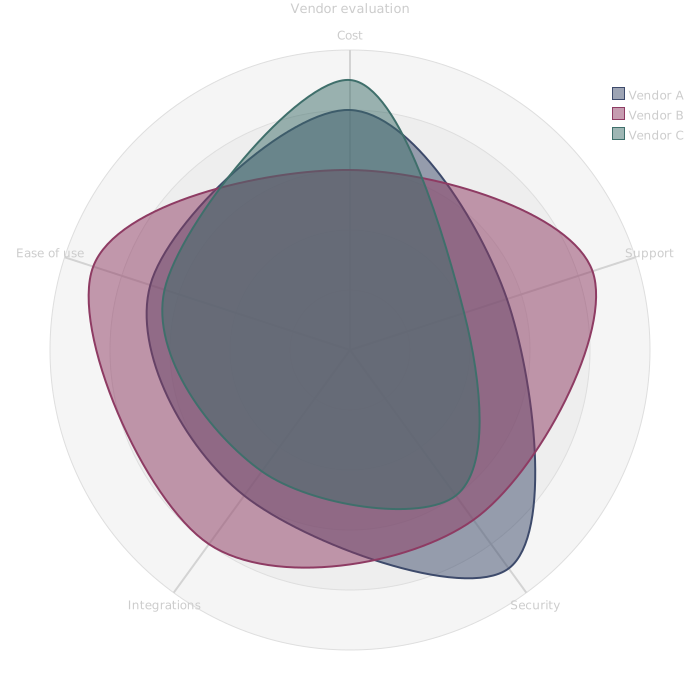
A radar chart, also called a spider chart, plots several values for one item on axes that radiate from a centre, then joins them into a shape. Overlaying the shapes of several items shows at a glance where each one is strong or weak.
Declare the axes once, then one curve per option with a value for each axis. Fix the scale so the shapes compare fairly.
Last updated: · Mermaid v11
Try it live
When to use radar chart
Vendor and tool evaluations
Score each option on the criteria that matter and overlay the results, so the trade-offs are visible in one picture.
Skills matrices
Show a team's strengths across disciplines and where hiring or training would help most.
Product comparisons
Compare releases or competing designs on performance, cost and usability scores kept as plain numbers in the source.
Key syntax
Beta: declared with radar-beta, and Mermaid's docs list it as a new diagram type, so the syntax may still change.
radar-betaDeclare the chartaxis a["A"], b["B"]The spokes, in ordercurve x["X"]{1, 2}One item: a value per axis, in axis ordermax 100Top of the scale (min sets the bottom)graticule polygonPolygon grid instead of circlesHow to create a radar chart with Mermaid
Open the FlowViz editor and type radar-beta on the first line.
Add a title: title My Comparison.
Declare the axes: axis cost["Cost"], support["Support"].
Add one curve per item with a value for each axis, in axis order.
Fix the scale with min 0 and max 100.
Export as SVG or PNG, or copy a share link.
Frequently asked questions
How many axes can a radar chart have?
As many as you declare, but five to eight stays readable. Each curve needs one value per axis, in the order the axes were declared.
How do I fix the scale?
Set min and max, for example min 0 and max 100. Without them the scale follows the data, which makes two charts hard to compare.
Can the grid be a polygon instead of circles?
Yes. Add graticule polygon. The number of rings is set with ticks.
Is the FlowViz radar chart maker free?
Yes. It is free with no account, and you can export SVG or PNG or share the chart as a link.
Start diagramming now
No signup. No install. Just open the editor and start writing.