Architecture Diagram
Free Online Architecture Diagram Maker
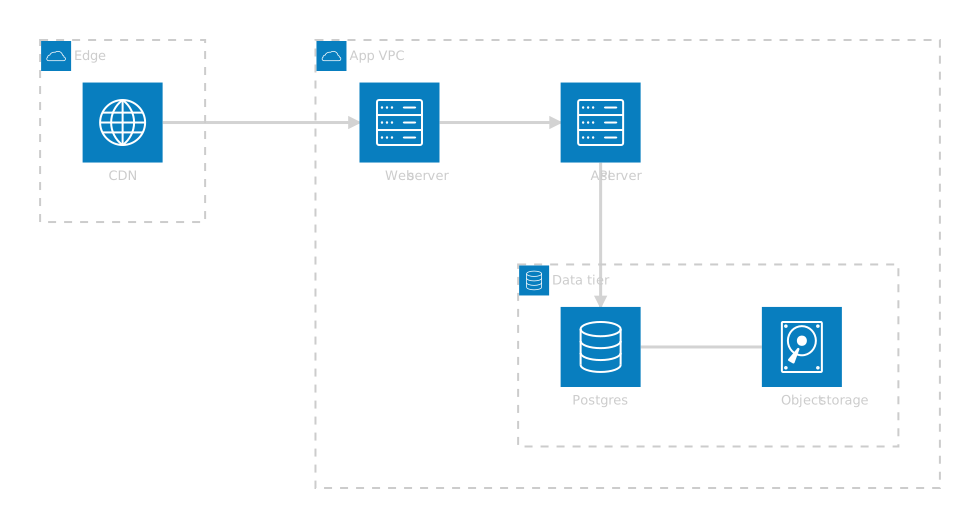
An architecture diagram shows the services, data stores and network boundaries of a system and how they connect. Mermaid's version draws each service with an icon, nests services inside groups such as clouds or VPCs, and routes connections between chosen sides.
Declare groups for your boundaries and services inside them, then connect the services side to side. The infrastructure picture lives in text next to your code.
Last updated: · Mermaid v11
Try it live
When to use architecture diagram
Cloud infrastructure docs
Describe VPCs, subnets and the services in them next to the infrastructure code, so the diagram is reviewed in the same pull request.
Onboarding
Give new engineers one picture of where requests enter, which services handle them and where data is stored.
Design reviews
Sketch a proposed change, a new cache or a split service, as a small edit to the current diagram, and compare the two versions as text.
Key syntax
Beta: declared with architecture-beta, and Mermaid's docs list it as a new diagram type, so the syntax may still change.
architecture-betaDeclare the diagramgroup id(cloud)[Label]A boundary, with an iconservice id(server)[Label] in gA service inside group ga:R --> L:bArrow from a's right side to b's lefta:B -- T:bPlain line, bottom to topserver database diskBuilt-in icons, plus cloud and internetHow to create a architecture diagram with Mermaid
Open the FlowViz editor and type architecture-beta on the first line.
Declare the boundaries: group app(cloud)[App VPC].
Add services with an icon and a group: service api(server)[API] in app.
Connect services, choosing sides: api:B --> T:db.
Rearrange by changing which sides the connections use.
Export as SVG or PNG, or copy a share link.
Frequently asked questions
Which icons can I use?
Mermaid ships five by default: cloud, database, disk, internet and server. Other icon packs have to be registered in code by the site rendering the diagram, which FlowViz does not do, so stick to those five.
What do the letters in db:L -- R:api mean?
They pick the side of each service the line attaches to: T, B, L or R for top, bottom, left and right. Choosing sides is how you steer the layout.
Can groups be nested?
Yes. Declare a group with in parent to place it inside another group, for example a subnet inside a VPC.
Should I use this or a C4 diagram?
Use an architecture diagram for infrastructure: services, storage and the network between them. Use C4 when you want to describe software systems, people and their relationships at a chosen level of detail.
Start diagramming now
No signup. No install. Just open the editor and start writing.