Packet Diagram
Free Online Packet Diagram Maker
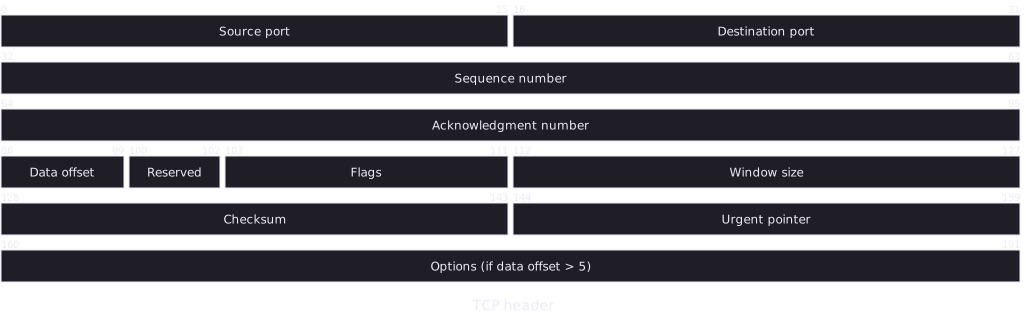
A packet diagram shows how the bits of a network packet, file format or hardware register are divided into fields. Each row is a fixed number of bits, usually 32, and each field is drawn as wide as the bits it occupies.
List each field with its bit range, or just its width, and the diagram wraps them into 32-bit rows like an RFC.
Last updated: · Mermaid v11
Try it live
When to use packet diagram
Protocol documentation
Describe a custom protocol header in the same RFC-style layout engineers already know, kept as text next to the parser.
Binary file formats
Document how a file header is laid out, magic number, version, flags, lengths, so readers do not have to reverse-engineer it.
Hardware registers
Show which bits of a register control what, for firmware and driver documentation.
Key syntax
A newer Mermaid diagram type. Recent Mermaid releases also accept plain packet, but packet-beta works in every Mermaid version that has this diagram, including the older ones some sites and apps still run. The +N field syntax needs Mermaid 11.7 or later.
packet-betaDeclare the diagram (recent Mermaid also accepts packet)title TextOptional title0-15: "Field"A field covering bits 0 to 1516: "Flag"A single-bit field+8: "Field"An 8-bit field after the previous oneHow to create a packet diagram with Mermaid
Open the FlowViz editor and type packet-beta on the first line.
Add a title: title My Header.
Add each field as start-end: "Name", counting bits from 0.
Or use +N: "Name" to add an N-bit field after the previous one.
Rows wrap at 32 bits, so a 64-bit field spans two rows.
Export as SVG or PNG, or copy a share link.
Frequently asked questions
What is a packet diagram used for?
Documenting the bit-level layout of a network header, file format or register: which bits hold which field. It is the layout used in RFCs.
How wide is each row?
32 bits by default, like an RFC diagram. Fields that cross a row boundary are split across rows.
Do I have to write every bit range by hand?
No. +8: "Field" adds an 8-bit field after the previous one, so inserting a field does not mean renumbering everything after it. You can mix +N and explicit ranges.
Is the FlowViz packet diagram maker free?
Yes. It is free with no account, and you can export SVG or PNG or share the diagram as a link.
Start diagramming now
No signup. No install. Just open the editor and start writing.