Sequence Diagram
Free Online Sequence Diagram Maker
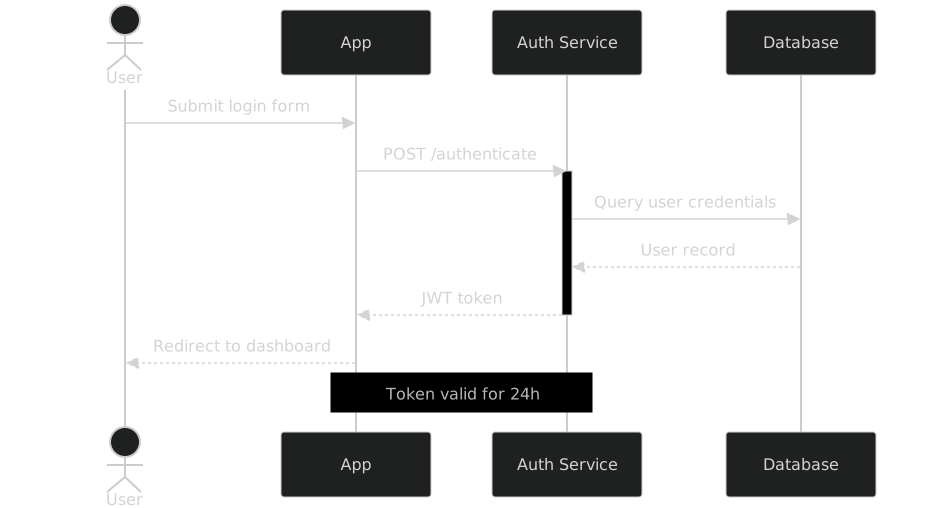
A sequence diagram is a type of UML diagram that shows how participants — such as a user, an app, and a server — exchange messages over time. Each participant gets a vertical lifeline, and arrows between lifelines represent requests and replies in the order they actually occur.
Create UML sequence diagrams to visualize interactions between systems, services, and users. Real-time preview, no signup.
Last updated: · Mermaid v11
Try it live
When to use sequence diagram
API documentation
Document REST API calls, authentication flows, and service-to-service communication as messages between participants. Solid arrows for requests and dashed replies keep the request/response contract explicit in a way prose never quite manages.
System design
Sketch microservice interactions, message passing, and event-driven architectures before committing to them. Adding a queue or a cache is one participant line, which keeps design reviews fast and concrete.
Bug investigation
Reconstruct the exact sequence of events leading to an incident to see where the failure entered the flow. A sequence diagram of the failing path is often the clearest artifact you can attach to a postmortem.
Key syntax
sequenceDiagramDeclare diagram typeparticipant ADeclare a participantactor U as UserParticipant shown as person iconA->>B: messageSolid arrow with messageA-->>B: replyDashed reply arrowactivate AShow activation barNote over A,B: textAdd note spanning participantsloop Every 5sLoop blockalt/elseConditional blockHow to create a sequence diagram with Mermaid
Open FlowViz and start with sequenceDiagram on the first line.
Declare your participants: participant Server or actor User for people.
Write messages between participants: A->>B: Request message for solid arrows.
Use A-->>B: Response for dashed reply arrows.
Add activate A and deactivate A to show processing time bars.
Use Note over A,B: text to add annotations.
Export as SVG when your diagram is complete.
Frequently asked questions
When should I use a sequence diagram instead of a flowchart?
Use a sequence diagram when *who* does something matters as much as what happens — it puts each participant on its own lifeline and shows messages crossing between them in time order. Use a flowchart when the actor is irrelevant and only the order of steps and decisions matters. A login flow drawn as a flowchart hides which side validates the password; drawn as a sequence diagram, that is the first thing you see.
What is a sequence diagram used for?
Showing how participants interact over time — API request flows, auth handshakes, and service-to-service communication are the classic cases.
What is the difference between ->> and -->> arrows?
A solid arrow (->>) is a request or call; a dashed arrow (-->>) is the reply. Async messages use -) and --).
Can I show loops and conditionals in a sequence diagram?
Yes — wrap messages in loop ... end for repetition, alt/else for branching, and opt for optional fragments.
Related tools
Start diagramming now
No signup. No install. Just open the editor and start writing.